
This article covers adding WEDOS.online checks quickly, using a setup wizard for a domain. To create individual checks, follow the guide OnLine – Checks ⧉.
In this article, you will learn:
Quick Setup
The WEDOS.online setup wizards helps you quickly create a strong suite of checks for any one domain. To access the wizard, simply visit the WEDOS OnLine admin panel ⧉ and click the New Check button in the navbar. Then, select Add domain (wizard) from the menu.
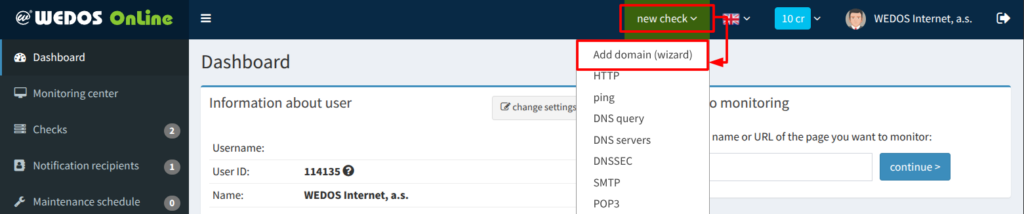
In the wizard, enter the domain you want to set up checks for, and click the Continue button. Wait for the system to analyze the domain and suggest available checks.
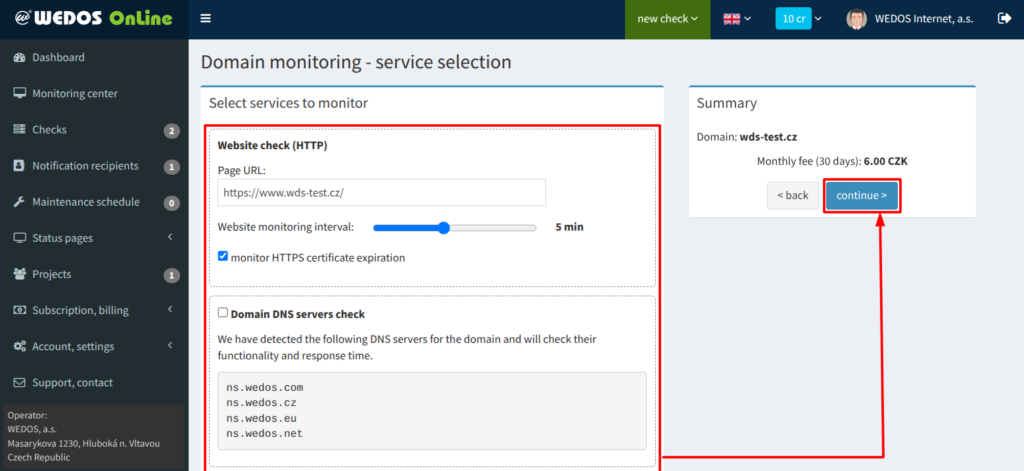
Once the analysis is complete, you will see:
- A list of available services to monitor
- The computed monthly fee
Select the checks to perform on the selected domain, then click the Continue button.
On the last page, enter your billing details and confirm using the Save and create checks button.
FAQ
Do I have to pay for each set of domain checks separately?
No, at the beginning of each month, you will only receive a link to make an online payment for the previous month if the sum of all pending payments for monitoring services in your account is at least 100 CZK.