
In this article, you will learn:
- How to protect subdomains of an existing domain
- When to protect a subdomain independently of an existing domain
- Frequently asked questions
Subdomain of Existing Domain
Any WEDOS.protection service supports subdomains one level above the main domain. This means that the service for a second-level (root) domain, such as domain.tld, can protect shop.domain.tld (a third-level domain), but not www.shop.domain.tld (a fourth-level domain). To protect a fourth-level domain, you need an independent service for the third-level domain (subdomain).
The domain level restriction also applies to Let’s Encrypt certificates issued for WEDOS.protection Domains.
If your main domain is already protected by WEDOS.protection, you can easily apply the same protection to any number of subdomains for that domain. To do this, first determine whether the subdomain directs to the same IP address as the main domain, or a different one:
- Same target IP as main domain: Subdomains directed to the same IP address as the main domain are automatically protected, as long as their DNS records direct to the WEDOS.protection proxy service. You do not need to perform any additional setup.
- Different target IP from the main domain: To protect a subdomain on an IP address different from the main domain, you need to add that subdomain’s target IP to the system. Protecting a subdomain this way is charged.
You can find more information about target IPs and DNS in the article Protection – DNS and Target IPs (Upstream).
Add Subdomain Protection
By adding a subdomain to an existing WEDOS.protection domain, you set up the following:
- An individual target IP address for the subdomain, different from the domain’s target IP.
- An additional fee equal to a separate service with a plan one level below the main domain’s plan. This means that a subdomain of a domain with the Advanced plan is charged as a separate service with the Start plan (1 euro), and a subdomain of a domain with the Expert plan is charged as a separate service with the Advanced plan.
- The Advanced subscription allows for one active target IP/CNAME per subdomain. The Expert subscription allows for multiple active targets per subdomain and the option to enable Weight and Backup settings for each subdomain.
The Start plan doesn’t support subdomains with different target IPs.
To set up a subdomain with a separate target IP, follow these steps:
- Log into the WEDOS.global admin panel ⧉.
- Select the domain you want to set up subdomains for.
- In the left menu, select Subdomains.
- Click the Add IP / CNAME for subdomain button.
- Enter the subdomain name (e.g.
shop), select the record type, and enter the target IPv4, IPv6, or CNAME address. - Optionally set the Weight of the subdomain (higher number holds more weight), or set the subdomain as Backup. (Expert subscription only)
- Click the Submit button.
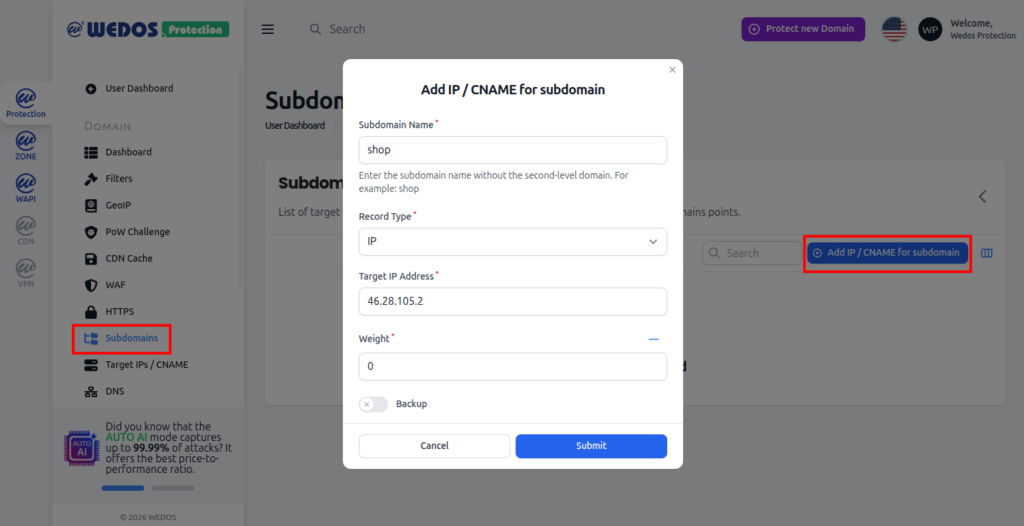
Once this is set up, make sure the subdomain’s DNS records direct to the WEDOS.protection proxy server, rather than the target IP.
Independent Subdomain
You may want to add your subdomain as an independent WEDOS.protection service under the following circumstances:
- Individual setup. Since all the subdomains under an existing Domain use that Domain’s settings, if you want to configure your subdomain individually, add it as a separate service.
- Requirement for lower-level domain. To use a lower-level domain, such as
www, with your subdomain, add it as a separate service.
To create an independent subdomain, create a new WEDOS.protection service according to the guide Protection – Add New Domain. Keep in mind, that subdomains only support the CNAME method.
FAQ
Do I need to pay anything for subdomains with the same IP as the main domain?
Only if you create them as separate WEDOS.protection services, or enter their IPs in the Subdomains settings. As long as you’re only using one service (the main domain), protecting such subdomains is free.
To keep your subdomains free, avoid adding their IPs in the Subdomains setup.
If my subdomain has two or more IP addresses (such asi IPv4 and IPv6), do I pay per name, or address?
You pay per IP address.
How do I make sure my DNS setup is correct?
Make sure that all subdomains use the proper WEDOS.protection IP addresses or CNAME records. For subdomains with the same target IP as the main domain, these are typically covered by the wildcard (*) record, unless that subdomain is mentioned elsewhere in DNS (such as if it has a specific MX or TXT record, which negates wildcard records).
Enter your subdomain in the browser. If there is a DNS resolution error, there is likely a problem with the wildcard, and you need to add the A/AAAA or CNAME records for that subdomain separately.