
This article deals with the WAF (Web Application Firewall) and Combo Rules features of WEDOS Protection. For single-dimension rules see Filters and GeoIP.
In this article, you will learn:
- How WEDOS Protection WAF and Combo Rules work
- How to set up:
- Combo Rules use cases and examples
- Frequently Asked Questions
WAF and Combo Rules
The WEDOS Protection Web Application Firewall (WAF) inspects incoming HTTP/HTTPS requests at the proxy layer and blocks those that match known attack patterns (SQL injection, XSS, RCE, path traversal, and other OWASP-class threats) before they reach your origin server. The WAF works alongside Filters and GeoIP, in Način AI protection that runs across the entire WEDOS Protection network.
Combo Rules sit on top of the WAF and let you define advanced, combined L3–L7 rules per domain. Each rule matches multiple conditions at once (IP/ASN, Geo, Path, User-Agent, JA4, JA4H, HTTP method, HTTP version), and the first matching rule wins. Combo Rules are useful when a single filter is not specific enough — for example, when you want to allow a known crawler ASN only on a specific path, or block a particular TLS fingerprint coming from a single country.
The WAF and Combo Rules complement, but do not replace, Filters and GeoIP. Pravila Filters in GeoIP so namenjena enodimenzionalni zaščiti, pravila Combo pa zahtevnejšim scenarijem. Prav tako se način AI še naprej izvaja vzporedno in ga ni mogoče izklopiti.
WAF and Combo Rules Setup
For the Start and Advanced subsription plans, WAF runs in Način AI only and Combo Rules are not available. To have access to WAF Mode selection and Combo Rules upgrade to the Expert plan.
To access the settings, follow these steps:
- Log into the WEDOS Global admin panel ⧉.
- Select a domain (or template) to set up.
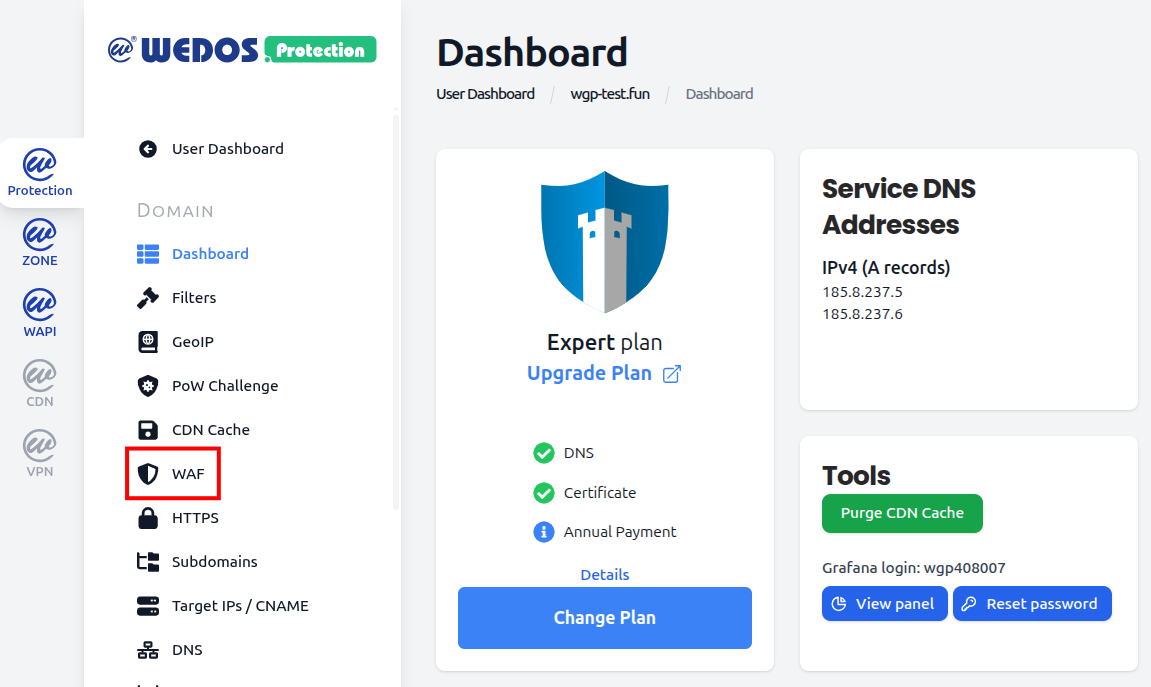
- In the left menu, click WAF.
WAF Mode
The WAF Mode selector controls the ruleset used by the Web Application Firewall for the selected domain. Three modes are available:
- Advanced WAF (celoten nabor pravil) – privzeto: Runs the complete WAF ruleset, including core protections and extended signatures for application-layer attacks. Recommended for most websites and applications.
- Basic WAF (samo osnovna pravila): Runs only the core ruleset. Useful when the full ruleset causes false positives on a legitimate but unusual application, and you need a smaller, more conservative set of signatures.
- Disabled: Turns off WAF rule evaluation entirely. AI Mode, Filters, GeoIP, and Combo Rules remain active.

Setting WAF Mode to Disabled only turns off the WAF rules. It does not disable AI Mode, Filters, GeoIP, or Combo Rules. Only disable the WAF if you have a specific reason — for example, while troubleshooting false positives.
Combo Rules
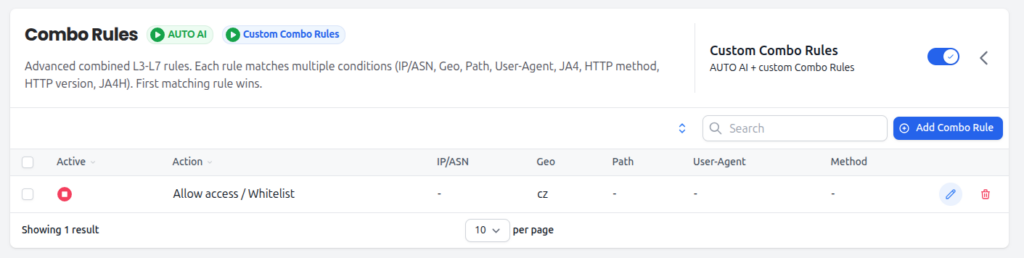
Combo Rules are advanced combined L3–L7 rules. Each rule matches on multiple conditions, and the first matching rule wins. Pravila razvrstite od najbolj specifičnih do najbolj splošnih – na primer najprej pravila za dovoljenje znanih dobrih iskalnikov, nato na dnu splošna blokada.
Combo Rules run alongside AUTO AI, ki promet vedno ocenjuje v ozadju. AUTO AI ni mogoče izklopiti.
Actions
When a Combo Rule matches, one of the following actions is applied:
- Dovoli dostop / Whitelist: Obide vse zaščitne plasti in zahtevo dostavi neposredno izvornemu strežniku. Uporabljajte le za zaupanja vreden, jasno prepoznan promet (npr. preverjen interni nadzorni sistem).
- Preverjanje CAPTCHA (Proof of Work): Serve a Proof of Work / bot challenge before allowing the request through.
- Blokiraj s stranjo z napako (HTTP 456): Blokiraj zahtevo in vrni customizable error page with HTTP status 456.
- Tiho blokiraj (zavrzi promet): Silently discard the request. The client receives no response. Useful against attack traffic where you do not want to confirm the request reached a server.
Matching fields
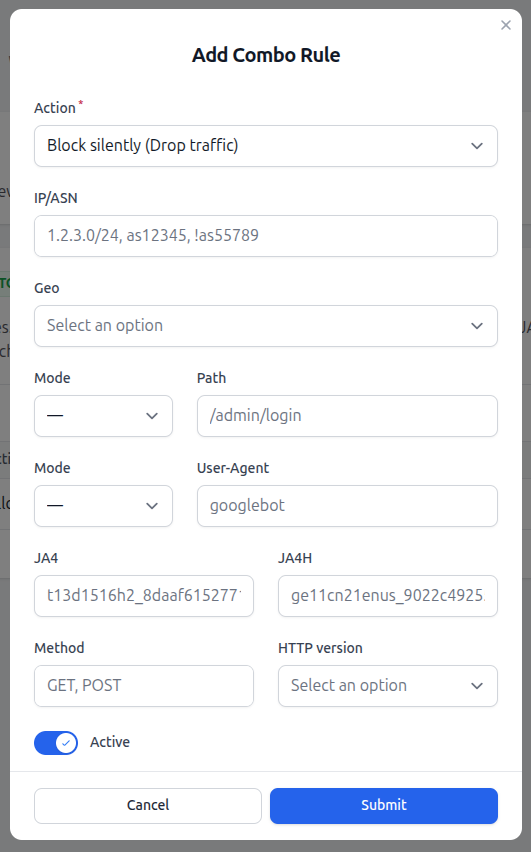
Each Combo Rule can match on up to nine fields. Any field can be left empty to act as a wildcard, and any field can be negated (using a ! prefix where supported, such as !as55789). For a rule to fire, all active fields must match.
- IP/ASN: Source IP address, CIDR range, or Autonomous System Number. Multiple values can be entered as a comma-separated list (e.g.
1.2.3.0/24, as12345, !as55789). - Geo: Country or continent code, as used by GeoIP.
- Path: URL path on the domain (e.g.
/admin/login). Supports exact and prefix matching depending on the selected Mode. - User-Agent: Value of the
User-AgentHTTP header (e.g.googlebot). Supports exact and substring matching depending on the selected Mode. - JA4: JA4 TLS fingerprint of the client. Useful for matching a specific client TLS stack independently of its self-declared User-Agent.
- JA4H: JA4H HTTP fingerprint of the client. Useful for catching bots that mimic a browser at the TLS layer but expose themselves at the HTTP layer.
- Method: One or more HTTP methods, comma-separated (e.g.
GET, POST). - HTTP version: HTTP protocol version of the request (e.g. HTTP/1.1, HTTP/2, HTTP/3).
Dodajanje pravila Combo Rule
To add a new Combo Rule, follow these steps:
- Make sure the Custom Combo Rules toggle is enabled.
- Click the Add Combo Rule button.
- Select the Action to apply when the rule matches.
- Fill in only the matching fields you need. Leave the rest empty to act as wildcards.
- Make sure the Active toggle is on, then click Submit.
Each rule in the list can be edited or deleted from the actions column. Use the Active indicator to enable or disable individual rules without deleting them.
Combo Rules are evaluated in order, prva ujemajoča se pravila pa zmaga. Bolj specifična pravila (npr. dovoli določen ASN na določeni poti) postavite nad bolj splošna (npr. blokiraj celotno državo).
Combo Rules Use Cases and Examples
Combo Rules are most useful when no single filter is specific enough. Some common scenarios:
Whitelist a known crawler by ASN
Goal: Dovolite prehod prometa Googlebot brez izzivov, tudi če bi ga sicer blokirala druga pravila.
Setup: Action Dovoli / Whitelist, IP/ASN as15169, User-Agent googlebot. To pravilo postavite nad vsa blokirna pravila.
Restrict an endpoint to POST-only
Goal: Končna točka API naj sprejema samo zahteve POST; vse drugo je neželeno.
Setup: Action Blokiraj s stranjo z napako (HTTP 456), Path /api/submit, Method GET, PUT, DELETE, PATCH, HEAD, OPTIONS. Zahteve z metodo POST se ne bodo ujemale in se bodo normalno nadaljevale.
Challenge a country on a sensitive path
Goal: Dovolite običajno brskanje iz države, vsak poskus dostopa do administracije pa preverite z izzivom.
Setup: Action Preverjanje CAPTCHA (Proof of Work), Geo cz, Path /admin/login.
Silently drop a known attack fingerprint
Goal: Drop traffic matching a JA4 fingerprint observed in a previous attack, without giving the attacker any feedback.
Setup: Action Tiho blokiraj (zavrzi promet), JA4 t13d1516h2_8daaf6152771_....
FAQ
What happens if I disable the WAF?
Only the WAF ruleset is turned off. AI Mode, Filters, pravila GeoIP in Combo se še naprej izvajajo. Vaša domena je še vedno zaščitena, vendar brez pravil aplikacijske ravni na podlagi podpisov, zato WAF priporočamo izklopiti le začasno, na primer med odpravljanjem lažno pozitivne zaznave.
When should I use Basic WAF instead of Advanced WAF?
Use Basic WAF only if the Advanced ruleset causes false positives on a legitimate application that you cannot adjust at the source. The Basic ruleset is more conservative and applies only the core rules. For most websites and APIs, the default Advanced WAF is the right choice.
How does rule ordering work?
Combo Rules are evaluated from top to bottom, and the first matching rule wins. Specifična pravila (na primer pravila za dovoljenje znanih dobrih iskalnikov ali zaupanja vrednih naslovov IP) postavite na vrh seznama, širša pravila (na primer blokade celotnih držav ali splošne zavrnitve) pa pod njih.
Do I need to fill in every field in a Combo Rule?
No. Any field left empty acts as a wildcard. A rule with only Geo = cz set matches all traffic from Czechia, regardless of IP, path, user agent, method, or version. For a rule to fire, all filled-in fields must match.
Can I negate a value in a Combo Rule?
Yes. Fields that accept comma-separated lists (such as IP/ASN) support negation with a ! prefix — for example, as12345, !as55789 matches AS12345 but explicitly excludes AS55789.
How are Combo Rules different from Filters?
Filters match on a single dimension at a time (one IP list, one ASN list, one User-Agent list, and so on). Combo Rules combine multiple dimensions into a single rule, so you can express conditions like “only this ASN, only on this path, only with this method” that a single filter cannot.
Can AUTO AI be turned off for Combo Rules?
No. AUTO AI is always enabled and runs in parallel with your Custom Combo Rules. You can add your own rules in custom mode, but the AI cannot be disabled.